
Documentation
Vector Math
VFX Loom 1.0 reference for the Vector Math node.
Vector
processing.vectorMath 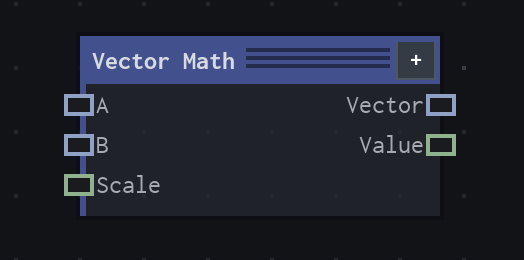
Overview
Applies a Vector2 operation.
Value node; vector operations write Vector, scalar operations such as Length, Distance, Dot, and Cross write Value.
- Category
- Vector
- Internal ID
processing.vectorMath- Version
- VFX Loom 1.0
Inputs
| Input | Type | Required | Default | Meaning |
|---|---|---|---|---|
| a | Vector2 | Required | (0,0) | See the overview for the node's documented behavior. |
| b | Vector2 | Optional | (0,0) | See the overview for the node's documented behavior. |
| scale | Scalar | Optional | 1 | See the overview for the node's documented behavior. |
Properties
| Property | Type | Default | Animatable | Range / options | Effect |
|---|---|---|---|---|---|
| Operation | Enum | Add | Not declared | Add · Subtract · Multiply · Divide · Scale · Normalize · Length · Distance · Dot · Cross | Selects the operation behavior; each option changes the operation described in the overview. |
Outputs
| Output | Type | Meaning |
|---|---|---|
| vector | Vector2 | The production node output described by the overview. |
| value | Scalar | The production node output described by the overview. |
Usage
In practice
- Use Vector Math for Vector2 arithmetic and for scalar measurements such as Length, Distance, Dot, and Cross.
- A and optional B provide the vector operands; Scale is used by the operations that scale a vector. The selected operation determines whether Vector, Value, or both outputs are meaningful.
- Normalize changes direction without preserving the original length; use Length or Distance when the scalar magnitude is the value the next node needs.
Worked example: Motion → Vector Math → Transform
Calculate or inspect a Vector2 movement before using it as an image or coordinate offset.
- Connect Motion to A and choose the operation that matches the next stage, such as Normalize or Scale.
- Connect B for operations that compare or combine two vectors, or connect Scale for a scalar multiplier.
- Send the Vector output to a transform-style input, or use Value for a scalar driver.
Notes / limitations
- Scalar operations write Value rather than Vector; check the output socket before wiring the result downstream.