
Documentation
Glow / Bloom
VFX Loom 1.0 reference for the Glow / Bloom node.
processing.glow 
Overview
Thresholds bright source pixels, blurs the contribution, tints it, and optionally composites it over the source.
Thresholds source luminance or alpha, applies mask alpha, blurs, then returns or composites the glow. Zero effective radius skips blur; zero intensity with Preserve Source is identity; source RGB remains unclamped HDR.
- Category
- Filters
- Internal ID
processing.glow- Version
- VFX Loom 1.0
Inputs
| Input | Type | Required | Default | Meaning |
|---|---|---|---|---|
| source | Image | Required | — | See the overview for the node's documented behavior. |
| mask | Image | Optional | — | optional alpha mask applied before glow blur |
Properties
| Property | Type | Default | Animatable | Range / options | Effect |
|---|---|---|---|---|---|
| Radius | Scalar | .02 | Yes | — | Animatable control; changing it over time varies the node response. |
| Intensity | Scalar | 1 | Yes | UI range: soft | Animatable control; changing it over time varies the node response. |
| Threshold | Scalar | .5 | Yes | — | Animatable control; changing it over time varies the node response. |
| Threshold From | Enum | Luminance | Not declared | Luminance · Alpha | Selects the threshold from behavior; each option changes the operation described in the overview. |
| Tint | Color | (1,1,1,1) | Yes | — | Animatable control; changing it over time varies the node response. |
| Blend Mode | Enum | Add | Not declared | Add · Screen · Over | Selects the blend mode behavior; each option changes the operation described in the overview. |
| Preserve Source | Bool | true | Not declared | — | Local control documented by the production node behavior. |
Outputs
| Output | Type | Meaning |
|---|---|---|
| out | Image | The production node output described by the overview. |
Usage
In practice
- Use Glow / Bloom when the graph needs Thresholds bright source pixels, blurs the contribution, tints it, and optionally composites it over the source.
- Thresholds source luminance or alpha, applies mask alpha, blurs, then returns or composites the glow. Zero effective radius skips blur; zero intensity with Preserve Source is identity; source RGB remains unclamped HDR.
- Place it after the image or mask it should process, and check its alpha and edge behavior before using the result in a tiled graph.
Examples
These examples show Glow / Bloom in supplied VFX Loom graph setups. Each graph link opens the corresponding node reference; the explanation below the media is specific to this node's role in that setup.
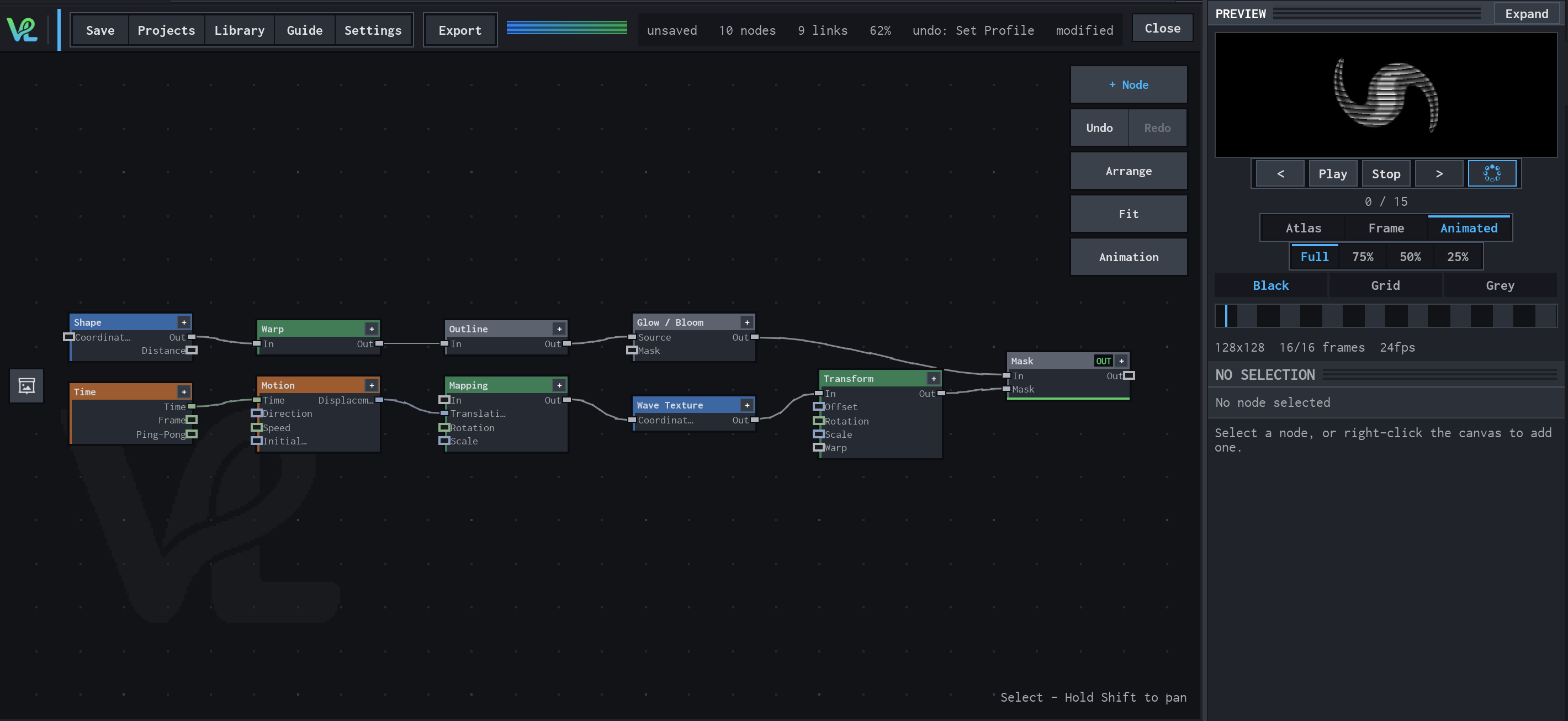
Shape / Warp / Glow with a moving wave branch
Two branches meet at Mask: a Shape branch is warped, outlined, and bloomed, while Time drives Motion → Mapping → Wave Texture → Transform to create a moving secondary field.
How Glow / Bloom contributes
Glow / Bloom turns the outlined form into the luminous upper branch that feeds Mask.
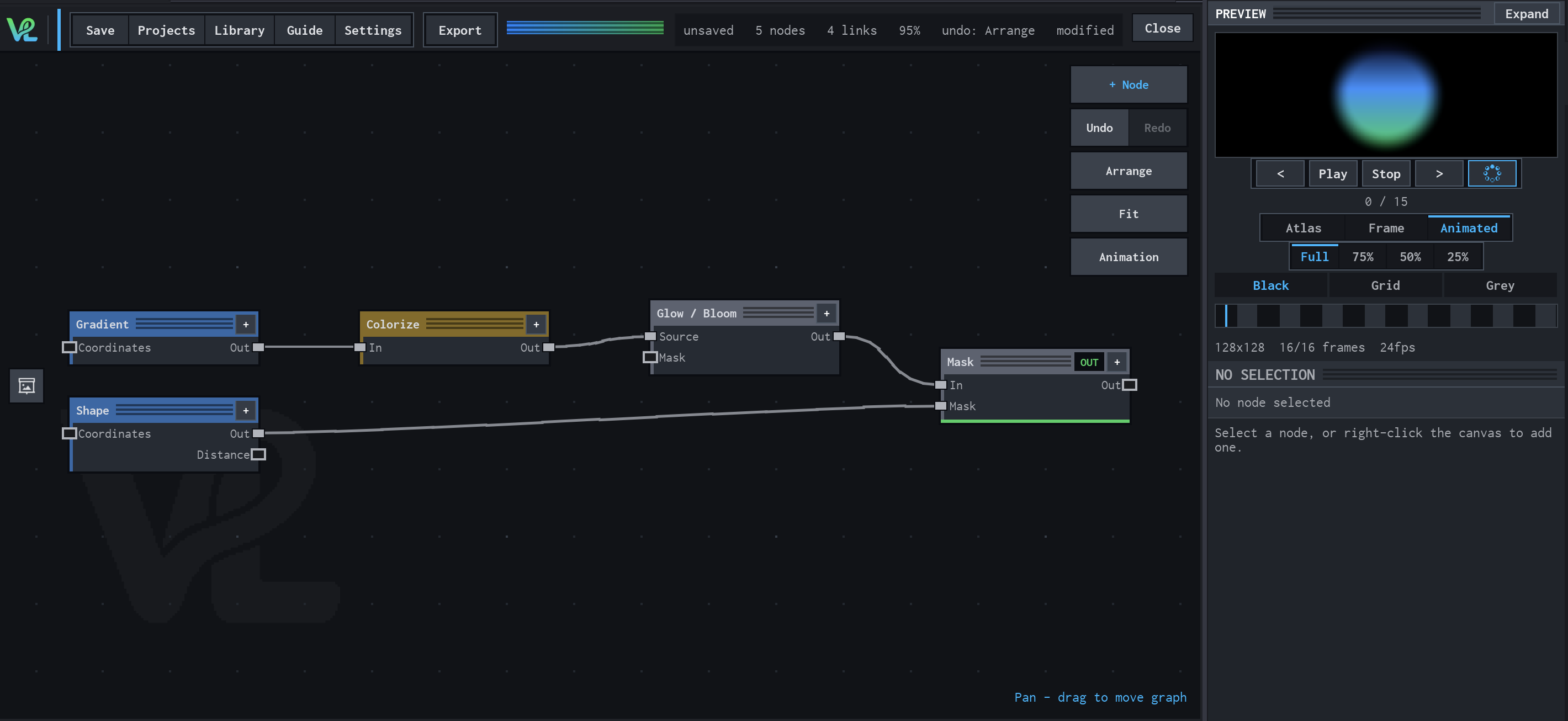
Gradient → Colorize → Glow / Bloom
A radial colour treatment combines a Gradient source with a Shape mask at Mask, then sends the coloured field through Glow / Bloom for the visible halo.
How Glow / Bloom contributes
Glow / Bloom expands the brightest coloured values into the halo that makes the result read as luminous.
Notes / limitations
- No step is declared for Radius, Intensity, or Threshold.