
Documentation
Wave
VFX Loom 1.1.0 reference for the Geometry Beta Wave node.
Geometry
processing.geometryWave 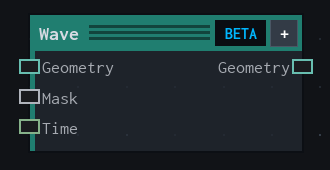
Overview
Applies an oscillating deformation to geometry.
Geometry Beta deformation. Applies an axis-based wave; an optional mask scales amplitude and an optional Time input supplies timeline seconds.
- Category
- Geometry
- Internal ID
processing.geometryWave- Version
- Current audited reference
Inputs
| Input | Type | Required | Default | Meaning |
|---|---|---|---|---|
| geometry | Geometry | Required | — | See the overview for the node's documented behavior. |
| mask | GeometryField | Optional | — | scales oscillating amplitude |
| time | Scalar | Optional | — | Timeline seconds, typically from Time → Seconds |
Properties
| Property | Type | Default | Animatable | Range / options | Effect |
|---|---|---|---|---|---|
| Axis | Enum | X | Not declared | X · Y · Z local | Selects the axis behavior; each option changes the operation described in the overview. |
| Amplitude | Scalar | .25 | Yes | Hard -5..5 · UI range: soft · Step .05 | Animatable control; changing it over time varies the node response. |
| Frequency | Scalar | 1 | Yes | Hard 0..20 · UI range: soft · Step .25 | Animatable control; changing it over time varies the node response. |
| Phase | Scalar | 0 | Yes | Hard -6.283185307179586..6.283185307179586 · UI range: soft · Step .1 | Animatable control; changing it over time varies the node response. |
| Speed | Scalar | 1 | Not declared | Hard -20..20 · UI range: soft · Step .05 | Local control documented by the production node behavior. |
| Offset | Scalar | 0 | Yes | Hard -5..5 · UI range: soft · Step .05 | Animatable control; changing it over time varies the node response. |
Outputs
| Output | Type | Meaning |
|---|---|---|
| geometry | Geometry | The production node output described by the overview. |
Usage
In practice
- Place Wave after Mesh Input or another geometry stage to apply an oscillating deformation.
- Connect a field to Mask to control the amplitude by position, noise, or curvature; connect Time for timeline-driven motion.
Notes / limitations
- Wave is a Geometry Beta deformation intended for lightweight procedural VFX motion.