
Documentation
Levels
VFX Loom 1.0 reference for the Levels node.
processing.levels 
Overview
Remaps tonal range: input range, gamma, output range.
Pointwise levels processor. A collapsed input range behaves as a hard threshold; Channels controls whether RGB, alpha, or both are remapped.
- Category
- Filters
- Internal ID
processing.levels- Version
- VFX Loom 1.0
Inputs
| Input | Type | Required | Default | Meaning |
|---|---|---|---|---|
| in | Image | Required | — | See the overview for the node's documented behavior. |
Properties
| Property | Type | Default | Animatable | Range / options | Effect |
|---|---|---|---|---|---|
| In Low | Scalar | 0 | Yes | Hard 0..1 | Raises the lower bound of the source window; values below it are remapped toward the output floor. |
| In High | Scalar | 1 | Yes | Hard 0..1 | Lowers the upper bound of the source window; values above it are remapped toward the output ceiling. |
| Gamma | Scalar | 1 | Yes | Hard .1..5 | Changes the response between the input bounds without moving those bounds. |
| Out Low | Scalar | 0 | Yes | Hard 0..1 | Sets the output value assigned to the lower end of the input window. |
| Out High | Scalar | 1 | Yes | Hard 0..1 | Sets the output value assigned to the upper end of the input window. |
| Invert | Bool | false | Not declared | — | Reverses the remapped response. |
| Channels | Enum | RGBA | Not declared | RGB + Alpha · RGB only · Alpha only | Selects whether RGB and alpha, RGB only, or alpha only is remapped. |
Outputs
| Output | Type | Meaning |
|---|---|---|
| out | Image | The production node output described by the overview. |
Usage
In practice
- Use Levels before Colorize or Gradient Map to decide which part of a scalar image occupies the useful visual range.
- In Low and In High set the source window; Gamma changes the response inside that window; Out Low and Out High remap the result into a new output range.
- Use Channels when alpha must remain untouched or when alpha alone is the control field. A collapsed input range behaves as a hard threshold.
Worked example: Noise → Levels → Colorize
Levels turns a broad or low-contrast procedural field into a deliberate mask before colour is applied.
- Connect a grayscale source such as Noise to In and lower In High or raise In Low until the important features occupy the working range.
- Adjust Gamma to move the visual shoulder without changing the endpoints, then use Out Low and Out High if the result needs a specific floor or ceiling.
- Connect Levels to Colorize and choose whether the ramp or source alpha should define the final coverage.
Examples
These examples show Levels in supplied VFX Loom graph setups. Each graph link opens the corresponding node reference; the explanation below the media is specific to this node's role in that setup.
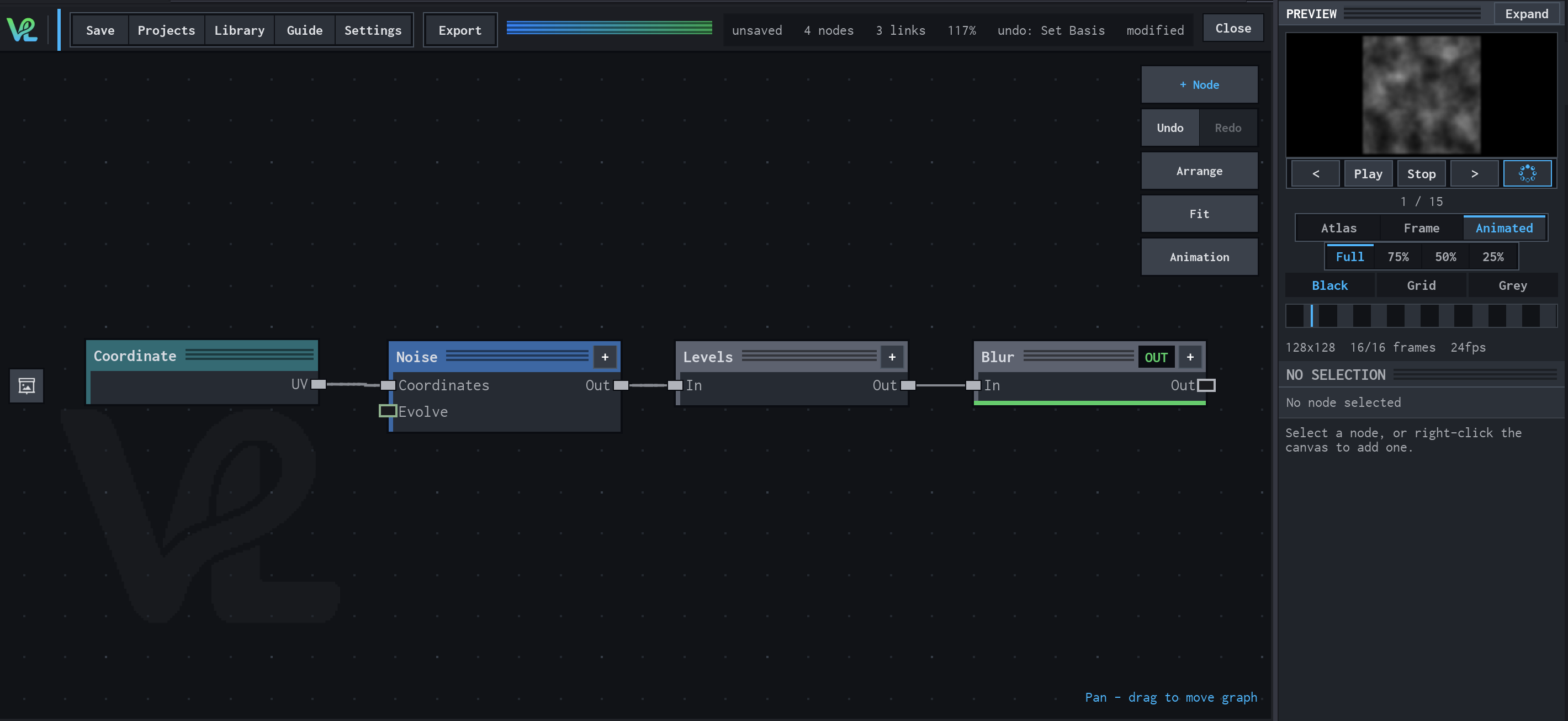
Noise → Levels → Blur
A compact grayscale texture chain: coordinates drive tileable noise, Levels tightens its tonal range, and Blur softens the result for a controllable field.
How Levels contributes
Levels remaps the noise contrast before blur. Raising or lowering the input range changes which parts of the field remain prominent.
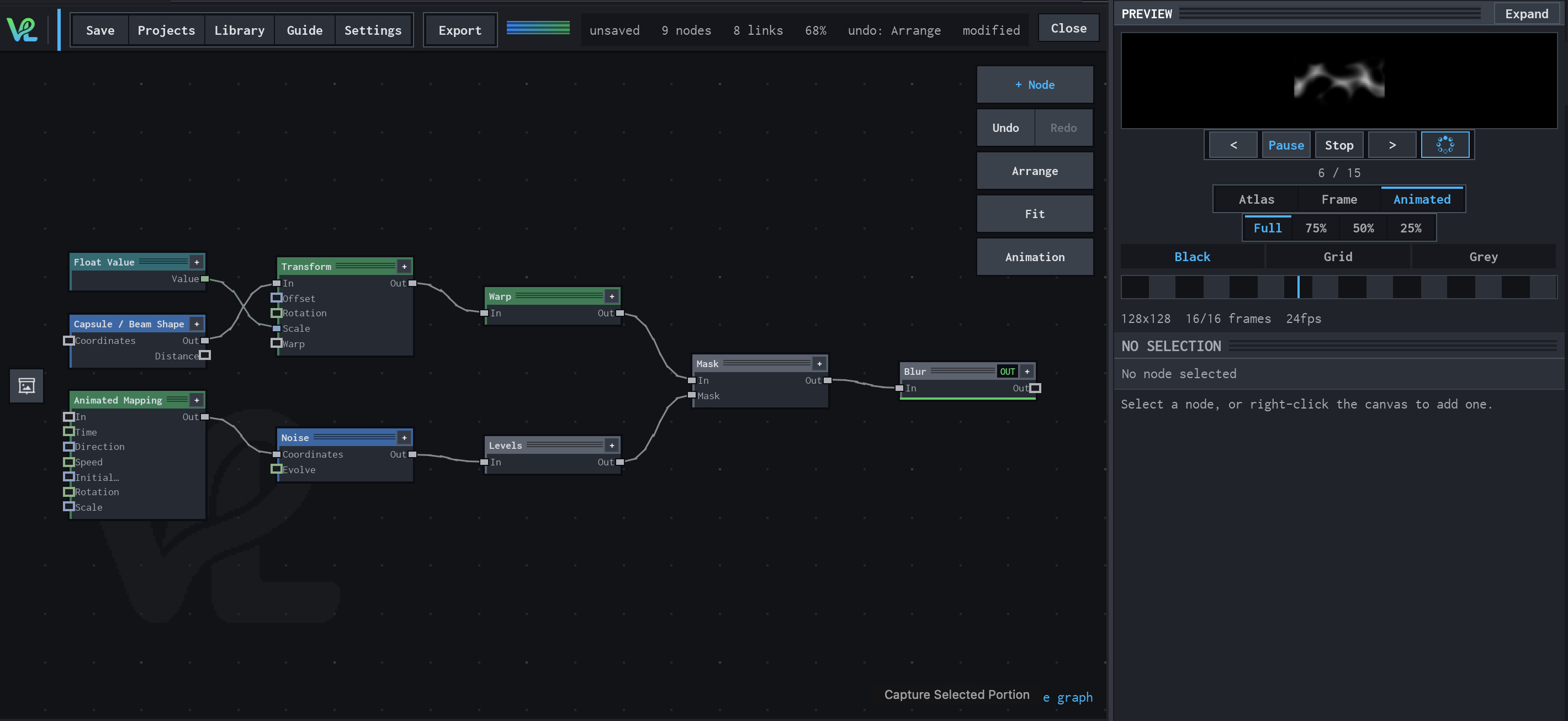
Animated Mapping → Noise → Levels → Mask → Blur
An animated procedural field meets a transformed capsule branch at Mask: Float Value controls Transform scale, while Animated Mapping drives Noise and Levels before the final Blur.
How Levels contributes
Levels tightens the moving noise into a more useful mask signal before the branches converge.
Notes / limitations
- Levels is pointwise: it remaps samples independently and does not blur or expand edges.
- The production source does not declare numeric parameter steps; the hard ranges shown here are not suggested snapping increments.