
Documentation
Wave Texture
VFX Loom 1.0 reference for the Wave Texture node.
Generators
generator.wave 
Overview
Continuous bands or rings with sine, triangle, or saw profiles.
Deterministic bands/rings generator with Sine, Triangle, and Saw profiles.
- Category
- Generators
- Internal ID
generator.wave- Version
- VFX Loom 1.0
Inputs
| Input | Type | Required | Default | Meaning |
|---|---|---|---|---|
| coordinates | Field | Optional | — | coordinate stream; defaults to UV |
Properties
| Property | Type | Default | Animatable | Range / options | Effect |
|---|---|---|---|---|---|
| Wave Type | Enum | Bands | Not declared | Bands · Rings | Selects the wave type behavior; each option changes the operation described in the overview. |
| Profile | Enum | Sine | Not declared | Sine · Triangle · Saw | Selects the profile behavior; each option changes the operation described in the overview. |
| Scale | Scalar | 6 | Yes | Hard 0..64 · UI range: soft | Animatable control; changing it over time varies the node response. |
| Rotation | Scalar | 0 degrees | Yes | Hard -360..360 · UI range: soft | Animatable control; changing it over time varies the node response. |
| Phase / Offset | Scalar | 0 | Yes | Hard -64..64 · UI range: soft | Animatable control; changing it over time varies the node response. |
Outputs
| Output | Type | Meaning |
|---|---|---|
| out | Image | The production node output described by the overview. |
Usage
In practice
- Use Wave Texture when the graph needs Continuous bands or rings with sine, triangle, or saw profiles.
- Deterministic bands/rings generator with Sine, Triangle, and Saw profiles.
- Use it as a source for a processing, colour, transform, or composite stage; leave optional coordinate inputs disconnected when the documented UV default is wanted.
Examples
These examples show Wave Texture in supplied VFX Loom graph setups. Each graph link opens the corresponding node reference; the explanation below the media is specific to this node's role in that setup.
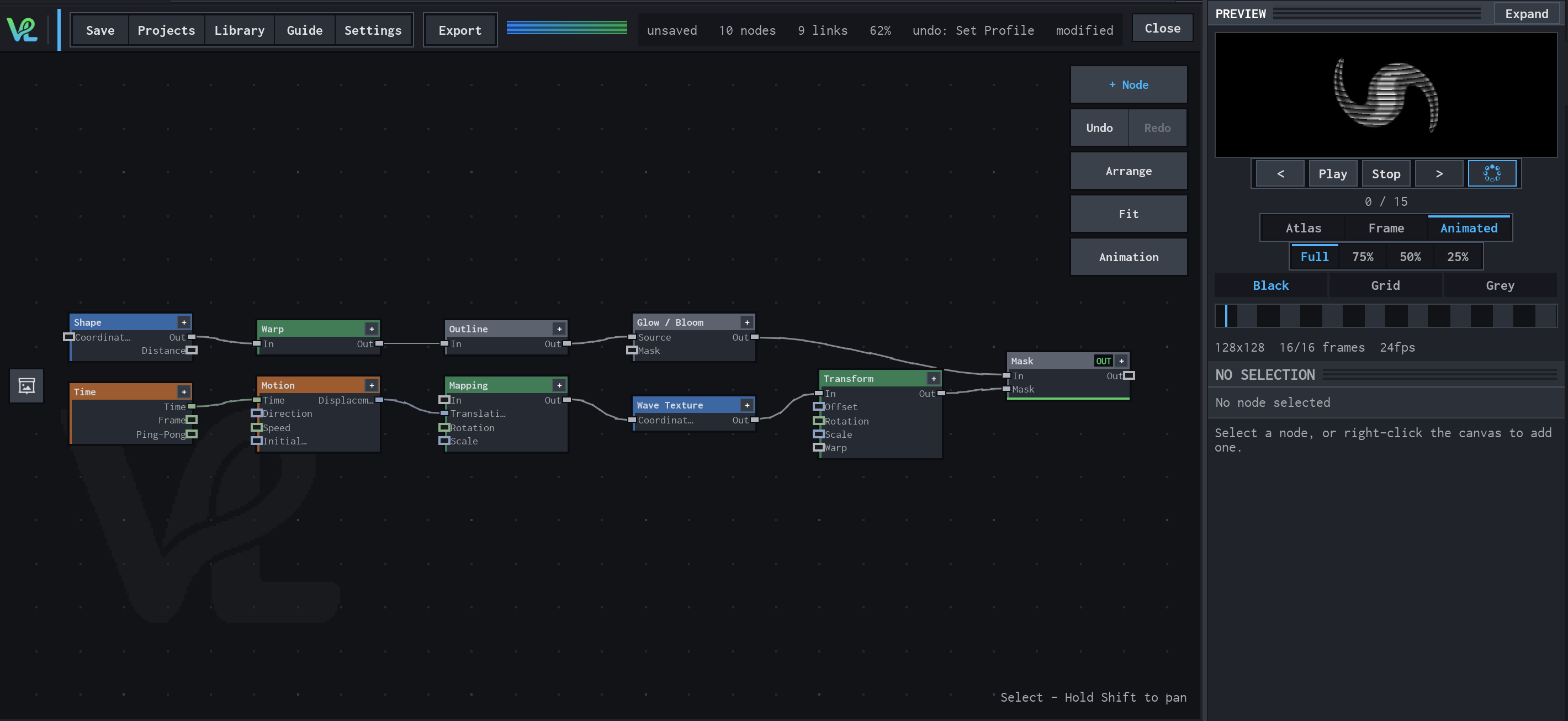
Shape / Warp / Glow with a moving wave branch
Two branches meet at Mask: a Shape branch is warped, outlined, and bloomed, while Time drives Motion → Mapping → Wave Texture → Transform to create a moving secondary field.
How Wave Texture contributes
Wave Texture turns the moving coordinates into the striped field visible in the preview.