
Documentation
Warp
VFX Loom 1.0 reference for the Warp node.
transform.warp 
Overview
Deforms the image with a formula: twist, bulge, lens or ripple.
Image deformation with Twist, Bulge, Barrel, and Ripple modes. Constant falloff ignores Radius; negative Amount reverses the modes that support reversal.
- Category
- Transform
- Internal ID
transform.warp- Version
- VFX Loom 1.0
Inputs
| Input | Type | Required | Default | Meaning |
|---|---|---|---|---|
| in | Image | Required | — | See the overview for the node's documented behavior. |
Properties
| Property | Type | Default | Animatable | Range / options | Effect |
|---|---|---|---|---|---|
| Mode | Enum | Twist | Not declared | Twist · Bulge / Pinch · Barrel / Pincushion · Ripple | Selects the mode behavior; each option changes the operation described in the overview. |
| Amount | Scalar | .5 | Yes | Hard -1..1 · UI range: soft | Animatable control; changing it over time varies the node response. |
| Center | Vector2 | (.5,.5) | Yes | — | Animatable control; changing it over time varies the node response. |
| Radius | Scalar | .5 | Yes | Hard 0..1 · UI range: soft | Animatable control; changing it over time varies the node response. |
| Falloff | Enum | Smooth | Not declared | Smooth · Linear · Hard edge · Hard edge | Selects the falloff behavior; each option changes the operation described in the overview. |
| Frequency | Scalar | 6 | Not declared | Hard 1..32 · Step 1 | hard 1..32, step 1, Ripple group |
| Phase | Scalar | 0 degrees | Yes | Hard -360..360 · UI range: soft | Animatable control; changing it over time varies the node response. |
| Sampling | Enum | Bilinear | Not declared | Smooth · Nearest | Selects the sampling behavior; each option changes the operation described in the overview. |
| Edges | Enum | Clamp | Not declared | Extend · Tile · Mirror · Empty | Selects the edges behavior; each option changes the operation described in the overview. |
Outputs
| Output | Type | Meaning |
|---|---|---|
| out | Image | The production node output described by the overview. |
Usage
In practice
- Use Warp when the graph needs Deforms the image with a formula: twist, bulge, lens or ripple.
- Image deformation with Twist, Bulge, Barrel, and Ripple modes. Constant falloff ignores Radius; negative Amount reverses the modes that support reversal.
- Use it where the graph needs coordinate or image-space movement; keep sampling and edge policy aligned with the source artwork.
Examples
These examples show Warp in supplied VFX Loom graph setups. Each graph link opens the corresponding node reference; the explanation below the media is specific to this node's role in that setup.
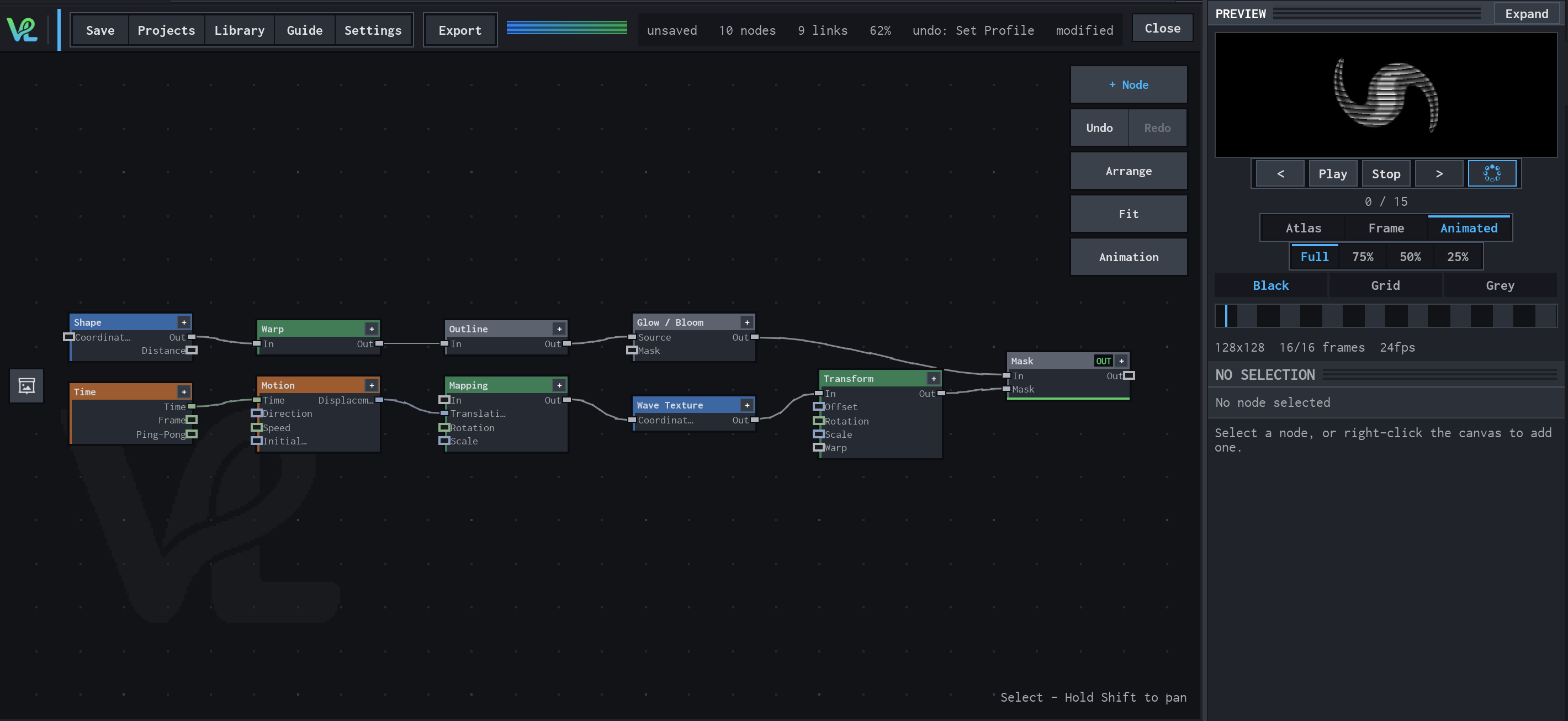
Shape / Warp / Glow with a moving wave branch
Two branches meet at Mask: a Shape branch is warped, outlined, and bloomed, while Time drives Motion → Mapping → Wave Texture → Transform to create a moving secondary field.
How Warp contributes
Warp deforms the Shape image before the edge treatment, so the outline and glow follow the distorted silhouette rather than the original circle.
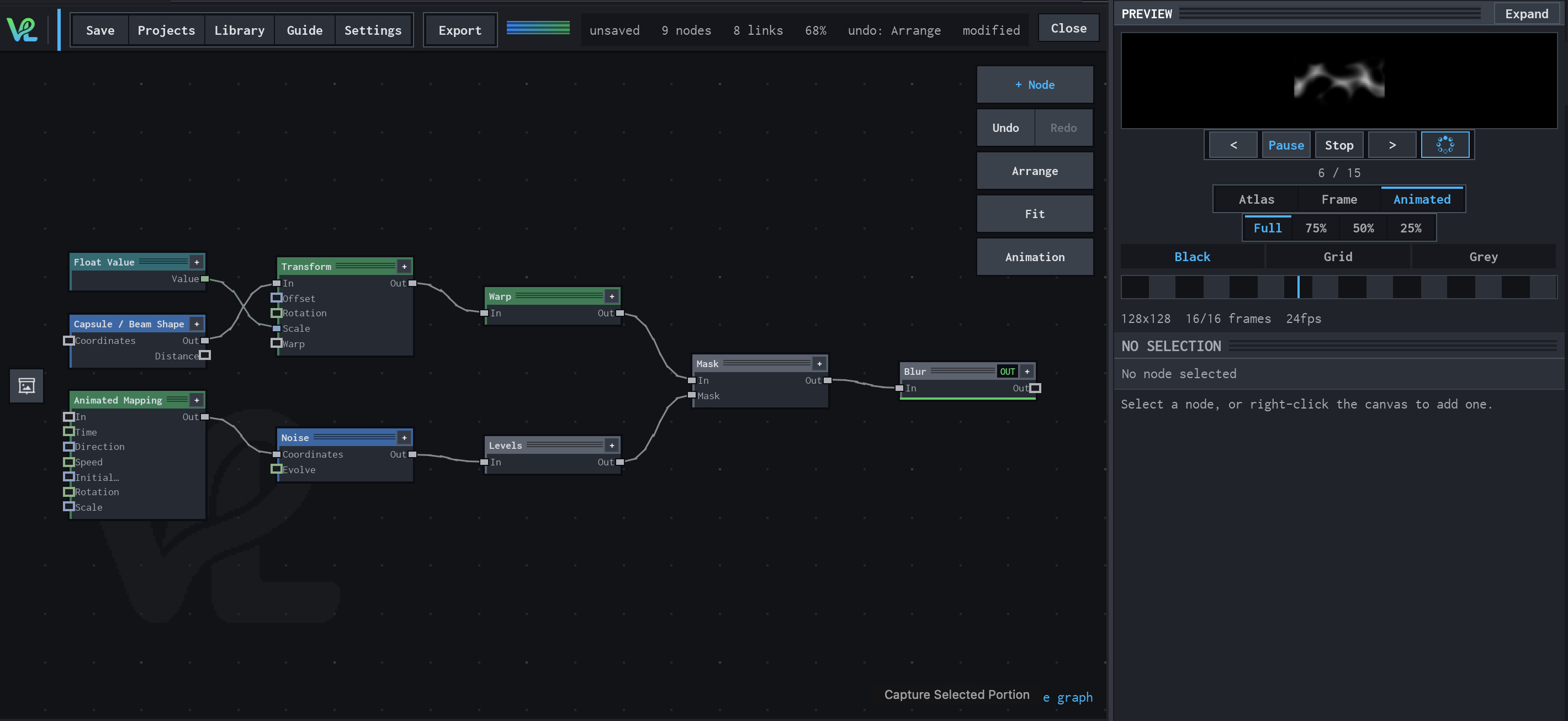
Animated Mapping → Noise → Levels → Mask → Blur
An animated procedural field meets a transformed capsule branch at Mask: Float Value controls Transform scale, while Animated Mapping drives Noise and Levels before the final Blur.
How Warp contributes
Warp deforms the transformed capsule before it reaches Mask, adding the non-linear shape change visible in the setup.
Notes / limitations
- No component bounds or step is declared for Center; no step is declared for Amount, Radius, or Phase.