
Documentation
Colorize
VFX Loom 1.0 reference for the Colorize node.
processing.colorize 
Overview
Reads one value from an Image and maps it through a four-stop colour ramp. Use it to turn a scalar mask or grayscale field into the final colour and alpha treatment.
- Category
- Color
- Internal ID
processing.colorize- Version
- VFX Loom 1.0
Inputs
| Input | Type | Required | Default | Meaning |
|---|---|---|---|---|
| In | Image | Required | — | The image whose selected channel drives the ramp lookup. Noise, Shape, and Levels are common scalar-field sources. |
Properties
| Property | Type | Default | Animatable | Range / options | Effect |
|---|---|---|---|---|---|
| Driven By | Enum | Luminance | No | Luminance · Alpha · Red | Chooses the input value used as ramp position. Luminance uses Rec. 709 weighting; Alpha reads the source alpha; Red reads the source red channel. |
| Stop 0 | Color | (0, 0, 0, 0) | Yes | Ramp endpoint | Sets the colour and alpha at the low end of the ramp. The default makes the lowest values transparent black. |
| Stop 1 | Color | (1/3, 1/3, 1/3, 1/3) | Yes | Interior stop | Adds a controllable colour and alpha shoulder between the two endpoints. |
| Stop 2 | Color | (2/3, 2/3, 2/3, 2/3) | Yes | Interior stop | Adds the second interior transition. Together with Stop 1 it lets a ramp place a saturated core and a hot shoulder where the eye needs them. |
| Stop 3 | Color | (1, 1, 1, 1) | Yes | Ramp endpoint | Sets the colour and alpha at the high end of the ramp. |
| Stop 1 At | Scalar | 1/3 | Yes | Hard 0..1 | Moves the first interior stop along the input-value axis. Lower values bring its colour transition toward the dark end; higher values hold it longer. |
| Stop 2 At | Scalar | 2/3 | Yes | Hard 0..1 | Moves the second interior stop. Use it with Stop 1 At to compress or open the middle colour band. |
| Alpha From | Enum | Ramp | No | Ramp · Keep Source · Driving Value · Opaque | Separates colour mapping from transparency. Ramp uses the sampled ramp alpha; Keep Source preserves input alpha; Driving Value uses the selected input value; Opaque writes alpha 1. |
Outputs
| Output | Type | Meaning |
|---|---|---|
| Out | Image | The ramp-coloured image with alpha chosen by Alpha From. |
Usage
In practice
- Use Colorize after a scalar generator or a contrast-shaping filter. It is an Image processor; for a Scalar value use Color Ramp instead.
- Choose Luminance for ordinary grayscale fields, Alpha when the source's coverage is the intended driver, and Red when the red channel carries a deliberate control signal.
- Use Alpha From Keep Source when tinting an already-shaped sprite. Use Ramp for a mask-to-colour workflow where the stop alphas define the silhouette, or Opaque when the result must fill the frame's alpha.
Worked example: Noise → Levels → Colorize
This is the canonical procedural colour pipeline in the production source. Levels decides which values occupy the useful range; Colorize decides what those values mean visually.
- Connect Noise Out to Levels and Levels Out to Colorize. Use Luminance as the driver for the grayscale field.
- Set Stop 0 to a dark transparent colour, Stop 1 to the deep body colour, Stop 2 to the saturated core, and Stop 3 to a bright opaque tip.
- Move Stop 1 At and Stop 2 At to choose whether the effect reads as broad smoke, a tight flame core, or a narrow electric accent. Keep Alpha From at Ramp when the ramp should also define coverage.
Examples
These examples show Colorize in supplied VFX Loom graph setups. Each graph link opens the corresponding node reference; the explanation below the media is specific to this node's role in that setup.
Gradient → Colorize → Glow / Bloom
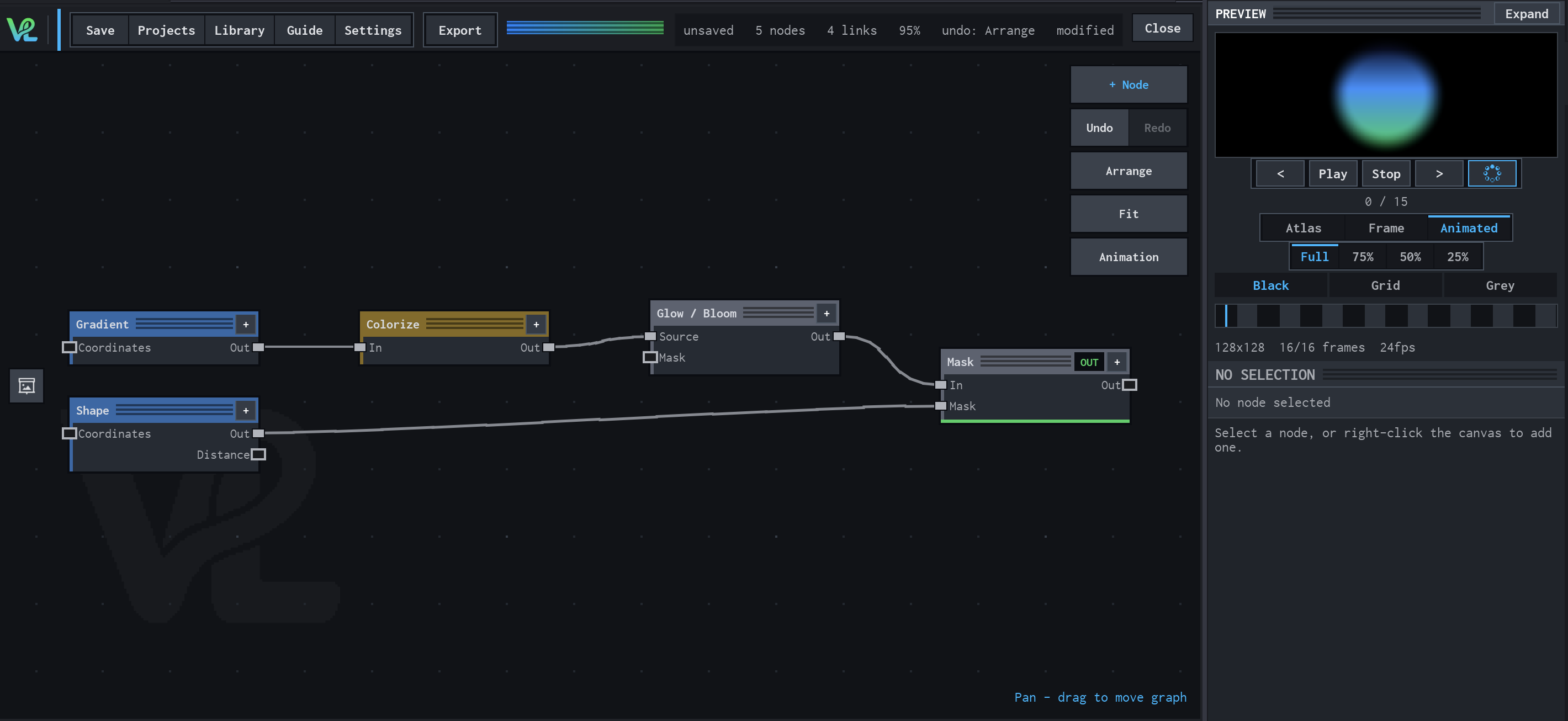
A radial colour treatment combines a Gradient source with a Shape mask at Mask, then sends the coloured field through Glow / Bloom for the visible halo.
How Colorize contributes
Colorize turns the Gradient values into the blue-green palette visible in the preview, keeping the ramp separate from the source geometry.
Notes / limitations
- The ramp lookup clamps the selected driving value to 0..1. Alpha From Driving Value still uses the selected value as the alpha source after clamping.
- The node's four stops are not Photoshop terminology; they are the production ramp descriptor shared with the ramp editor.
- Colorize expects an Image. Color Ramp is the separate node for mapping a Scalar value to Color.