
Documentation
Gradient
VFX Loom 1.0 reference for the Gradient node.
generator.gradient 
Overview
Creates a linear, radial, or angular ramp from a coordinate Field. Use it for controlled falloffs, bands, sweeps, and masks that need predictable spatial structure.
Samples the optional coordinate Field and keeps the canonical UV behavior when disconnected.
- Category
- Generators
- Internal ID
generator.gradient- Version
- VFX Loom 1.0
Inputs
| Input | Type | Required | Default | Meaning |
|---|---|---|---|---|
| coordinates | Field | Optional | — | coordinate stream; defaults to UV |
Properties
| Property | Type | Default | Animatable | Range / options | Effect |
|---|---|---|---|---|---|
| Type | Enum | Linear | Not declared | Linear · Radial · Angular | Chooses Linear, Radial, or Angular spatial sampling. |
| Angle | Scalar | 0 degrees | Yes | Hard 0..360 | Rotates the directional or angular ramp; it has no useful role for every Type. |
| Center | Vector2 | (.5,.5) | Yes | — | Sets the origin for Radial and Angular modes. |
| Scale | Scalar | 1 | Yes | Hard .01..8 | Changes the ramp frequency or distance scale in the sampled coordinate space. |
| Repeat | Enum | Clamp | Not declared | Clamp · Repeat · Mirror | Controls whether the ramp clamps, repeats, or mirrors outside its base span. |
| Gamma | Scalar | 1 | Yes | Hard .1..4 | Redistributes values within the ramp without changing the sampled coordinate layout. |
Outputs
| Output | Type | Meaning |
|---|---|---|
| out | Image | The production node output described by the overview. |
Usage
In practice
- Leave Coordinates disconnected for the canonical UV space. Connect Mapping when the ramp needs to scroll, rotate, scale, or use another procedural coordinate field.
- Choose Linear for a directional transition, Radial for distance from Center, and Angular for a sweep around Center. Repeat and Mirror decide what happens outside the first ramp span.
- Use Gamma to reshape the ramp without replacing the spatial layout; use Colorize or Gradient Map afterward when the grayscale field needs final colour.
Worked example: Gradient → Colorize
Build a controllable wipe, radial glow, or colour sweep by separating spatial structure from colour treatment.
- Add Gradient and start with Linear, the default UV Coordinates, and Repeat set to Clamp.
- For a radial effect, switch Type to Radial and move Center; for a sweep, choose Angular and animate Angle.
- Connect the output to Colorize when the ramp should become a multi-stop colour and alpha treatment.
Examples
These examples show Gradient in supplied VFX Loom graph setups. Each graph link opens the corresponding node reference; the explanation below the media is specific to this node's role in that setup.
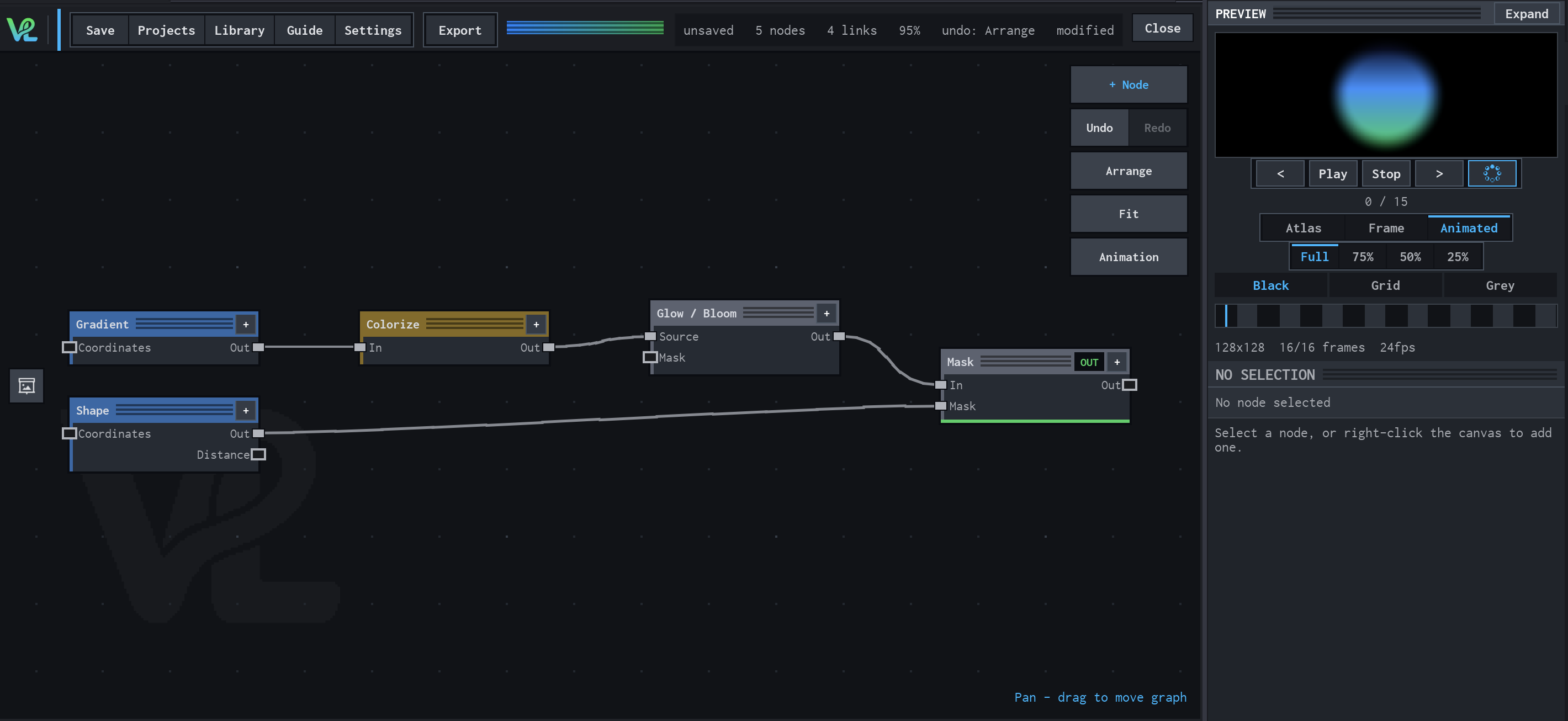
Gradient → Colorize → Glow / Bloom
A radial colour treatment combines a Gradient source with a Shape mask at Mask, then sends the coloured field through Glow / Bloom for the visible halo.
How Gradient contributes
Gradient supplies the continuous radial field. Its coordinate space establishes the large-scale colour transition that Colorize remaps.
Notes / limitations
- Center has no declared component bounds, and the production definition does not declare steps for Scale or Gamma.
- Gamma changes the value distribution of the ramp; it does not change which coordinate space is sampled.