
Documentation
Float Math
VFX Loom 1.0 reference for the Float Math node.
Math
processing.floatMath 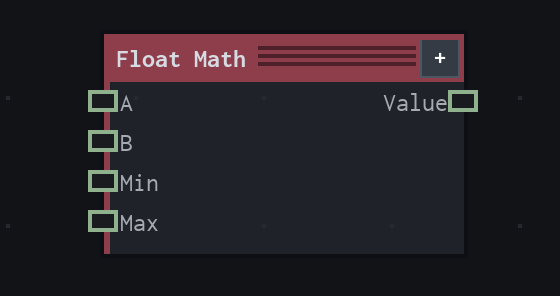
Overview
Applies a scalar math operation.
Value node; the selected operation consumes A, optional B, and optional Min/Max inputs where applicable.
- Category
- Math
- Internal ID
processing.floatMath- Version
- VFX Loom 1.0
Inputs
| Input | Type | Required | Default | Meaning |
|---|---|---|---|---|
| a | Scalar | Required | 0 | See the overview for the node's documented behavior. |
| b | Scalar | Optional | 0 | See the overview for the node's documented behavior. |
| min | Scalar | Optional | 0 | See the overview for the node's documented behavior. |
| max | Scalar | Optional | 1 | See the overview for the node's documented behavior. |
Properties
| Property | Type | Default | Animatable | Range / options | Effect |
|---|---|---|---|---|---|
| Operation | Enum | Add | Not declared | Add · Subtract · Multiply · Divide · Power · Min · Max · Clamp · Floor · Ceil · Round · Abs · Sign · Sin · Cos · Tan · Sqrt · Fraction · Modulo | Selects the operation behavior; each option changes the operation described in the overview. |
Outputs
| Output | Type | Meaning |
|---|---|---|
| value | Scalar | The production node output described by the overview. |
Usage
In practice
- Use Float Math for scalar arithmetic, comparisons, clamps, rounding, trigonometry, and other small control calculations inside a graph.
- A and B are the primary operands. Min and Max matter for operations such as Clamp; unused optional inputs do not change operations that do not consume them.
- Choose the operation first, then connect only the operands that operation needs. The node writes a scalar Value output.
Worked example: Time → Float Math → Noise
Shape a timeline value before using it to drive a procedural parameter.
- Connect Time to A and choose an operation such as Multiply, Clamp, Fraction, or Sin.
- Connect B, Min, or Max only when the selected operation uses them, then inspect the scalar result.
- Connect Value to an animatable control such as Noise Evolve or a mapping input.
Notes / limitations
- The selected operation determines which optional inputs are meaningful; the table lists the complete production input surface.