
Documentation
Distortion
VFX Loom 1.0 reference for the Distortion node.
Transform
transform.distortion 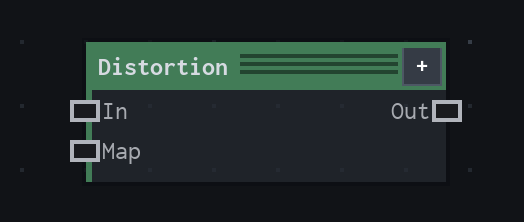
Overview
Offsets where the source is sampled, driven by a map.
Map-driven image sampler. RG reads red/green vectors; Directional reads luminance along Angle; Radial pushes from Center. The map is sampled with Clamp and source edges use the selected mode.
- Category
- Transform
- Internal ID
transform.distortion- Version
- VFX Loom 1.0
Inputs
| Input | Type | Required | Default | Meaning |
|---|---|---|---|---|
| in | Image | Required | — | The source image being sampled. |
| map | Image | Optional | — | Optional displacement map. When disconnected, Distortion passes the source image through. |
Properties
| Property | Type | Default | Animatable | Range / options | Effect |
|---|---|---|---|---|---|
| Strength | Scalar | .1 | Yes | Hard -1..1 · UI range: soft | Scales the displacement distance. |
| Vectors | Enum | RG | Not declared | Red / Green · Directional · Radial | Chooses RG vector reading, Directional luminance reading, or Radial displacement from Center. |
| Neutral | Scalar | .5 | Not declared | Hard 0..1 | Sets the map value treated as no displacement. |
| Angle | Scalar | 90 degrees | Yes | Hard -360..360 · UI range: soft | Sets the direction used by Directional mode. |
| Center | Vector2 | (.5,.5) | Yes | — | Sets the origin used by Radial mode. |
| Sampling | Enum | Bilinear | Not declared | Smooth · Nearest | Chooses smooth/bilinear or nearest source reconstruction. |
| Edges | Enum | Clamp | Not declared | Extend · Tile · Mirror · Empty | Chooses Extend, Tile, Mirror, or Empty behavior outside the source image. |
Outputs
| Output | Type | Meaning |
|---|---|---|
| out | Image | The production node output described by the overview. |
Usage
In practice
- Use Distortion when a map should move where the source image is sampled. With no displacement map, the operation passes the image through.
- Vectors selects the interpretation of the map: RG reads red/green vectors, Directional reads luminance along Angle, and Radial pushes from Center.
- Strength controls displacement amplitude; Neutral defines the no-motion value for map-driven modes; Sampling and Edges control reconstruction and source-boundary behavior.
Worked example: Noise → Distortion → Image
Use a procedural field to create heat haze, refraction, or turbulence without changing the source image itself.
- Create or connect an image to In and a suitable displacement map to Map.
- Choose RG for explicit red/green vectors, Directional for a luminance-driven direction, or Radial for a push around Center.
- Start with a low Strength, then choose Bilinear/Smooth sampling and an Edges mode that fits the source boundary.
Notes / limitations
- Distortion samples the map with Clamp while Edges controls the source image. These are separate boundary decisions.
- Center has no declared component bounds, and the source does not declare steps for Strength, Neutral, or Angle.